Thoughts on teaching, technology, learning and life in an era of change.

Archive for the ‘ Technology ’ Category

How to resize those images
January 17th, 2008

I like to illustrate my blog posts with images and photographs. One of the essential processes I must go through is resizing the photographs or screen shots that I display in my blog.

Why do I resize the image? I have two objectives. One is so that it will neatly fit in the area that my blogging template allows for text and images. That area is 450 pixels wide. The other objective is to reduce the file size of the image. For example, a screen shot may have an image file size 0f 400kb but through image resizing that may be reduced to 30kb for example. It will download much more quickly.>

You wish to display a digital camera image on your blog. Digital cameras allow you to create images of different sizes. The size of the image is also dependent upon the settings you have specified on your camera. In this case, when I refer to dimensions “height” and “width”. For example, the two cameras that I use can produce images in a variety of dimensions. Consider the table below.
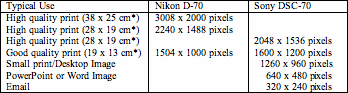
I usually “capture” or take my digital photographs at the highest resolution or largest dimension so that, for want of a better expression, I have plenty of “data” to work with when I edit the digital photograph. I find that with a larger image you can create an amended photograph with excellent detail and clarity when you resize it for printing, inclusion in a document or hosting on the Internet.

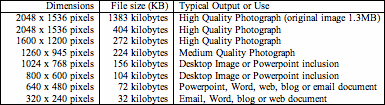
As an aside, the higher the dimensions an image possesses the greater its file size will be in kilobytes, most of the time. Consider the table below that shows the file size of the “north beach” digital photograph after it has been resized and saved at a “High Quality” setting in the JPG file format at a variety of different dimensions. You will observe that the original image weighs in at 1383kb. If it is simply re-saved it immediately drops in size to 404kb. As one decreases the dimensions of the image its file size drops as well.
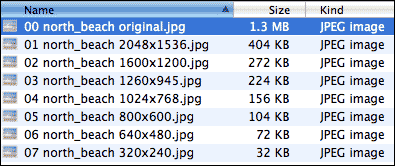
All of the images listed above are available from this online directory.  This is a screen shot of the directory on my mac.
I like to work with Adobe Photoshop or Photoshop Elements. If I need to resize just a few images I will simply open each image in turn and select Image menu > Resize > Image Resize. The following dialogue box will appear.
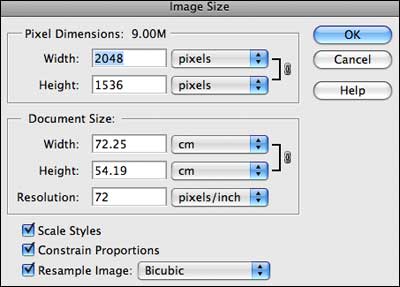
In the example above you can see that the original image is 2048 x 1536 pixels. The resolution is set at 72 pixels per inch which is the ideal resolution for display on the web. I prefer to work pixels in terms of units. Other users prefer centimetres or inches. I can visualise pixels better on the screen.
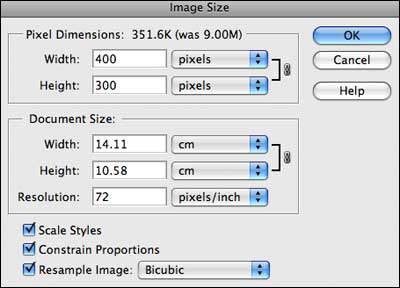
I wish to give the image a width of 400 pixels. I simply type 400 in the width field. Notice that the checkbox “Constrain Proprtions” is selected. That ensures that the resized image is not distorted. Photoshop Elements automatically set the height at 300 pixels. Once I have completed the two fields I click OK.

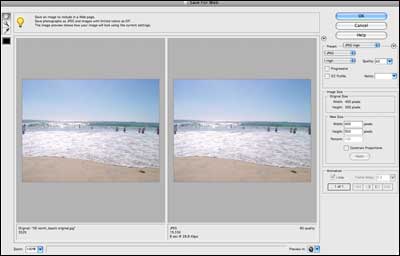
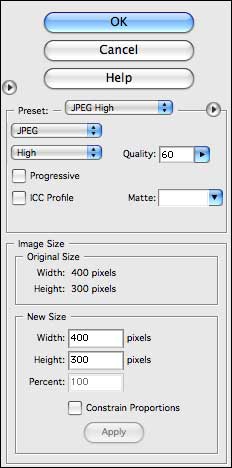
Adobe Photoshop and Photsoshop Elements have a “Save for Web” menu option from the File menu that gives you a great deal of control over the dimensions, file size and quality of the image. You can alter the quality and numbers of colours and view the impact in real time. 
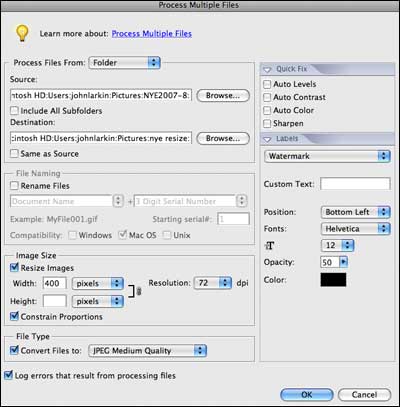
Photoshop and Photoshop Elements also allow you to batch process a folder full of images so that all are resized to the dimensions that you prescribe. 
Why would you like to resize an image? Well, there are a number of reasons:

1. Images with large dimensions are also large in file size. The North Beach image before resizing is 1.2 megabytes. After resizing it is 20 kilobytes. An amazing reduction in size. It is easy for you to include this image in a word processing document, PowerPoint presentation or an email.
2. Placement within a document. Do not simply import large images into a Word document and then resize it. The file size of your document will be too large as all the original image data is retained.
3. Importing into PowerPoint. Do not simply import large images into a PowerPoint presentation and then resize it. The file size of your document will be too large as all the original image data is retained.
4. Emailing to a friend. What would your email recipient prefer? A 1mb or a 100k file?
5. Posting to the Internet. Keep the image a reasonable size so that download times are reduced.Creating a desktop image.

You can download a set of instructions in pdf or word format that I created for resizing images in addition to other common image processing operations from my digital photography workshop page.

There are alternatives to Photoshop and Photoshop Elements when it comes to resizing images. On the Mac there is the excellent programme Pixelmator which allows for batch processing of images as well. On the PC there is a dedicated tool called PixResizer that also performs batch operations.

Please share your own techniques below.

Immigration to Australia ~ resources for students of history
January 17th, 2008

During the course of Year Ten my students study a Stage 5 unit of history focused upon Immigration (NSW BOS Syllabus). One of the very first questions that I ask the students is “Which country do your ancestors hail from?” The students share their origins and there is a mixture of surprise and recognition as their various backgrounds are revealed. My own background is a mix of Irish and English heritage. It is not unusual for students in my class to have European, South American and Asian backgrounds. Some countries of origin predominate more than others within our school. Our region saw a great deal of immigration, particularly from Europe, after the Second World War.

There are some excellent resources on the Internet that I share with the students. One in particular is a web site established by the Migration Heritage Centre. Words almost fail me on this site. There is a wealth of primary historical source material. There are documents, photographs, community newspapers, video interviews and oral history reports. The site is well designed and the quality of the media is excellent. The content is relevant, rich and and varied. Anyone would enjoy exploring this site. There are dedicated stories within the site and I shall briefly look at some of these stories below.

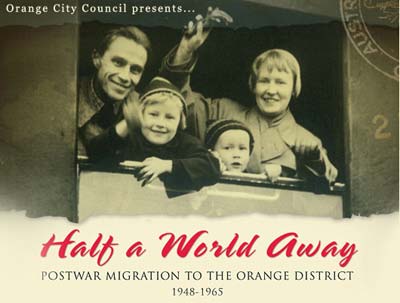
The first, Half A World Away, looks at post war migration to a country town in NSW called Orange. It is located across the Blue Mountains, several hours west of Sydney by car. For migrants from Europe the country town of Orange would have been a whole new universe. A wonderful town yet so different to Europe. There are stories from  more than 20 different families. Some of the topics covered include Europe After The War, Journey To The End Of The Earth, Jobs For Everyone and a Time To Relax. The stories and photographs are captivating and intriguing. Perhaps some of your relatives live there now?

Another story, Pai Nai Ma (Where Have You been?) deals with the expereinces of Thai migrants to Australia. One of the first Thais I ever met was Miss Suwana at Holy Cross College, Bellambi back in 1981. She taught Thai, French and German as well as having an excellent command of the English language. Thai immigration to Australia stretches back to the 1860s however after 1901 it slowed with the introduction of the most distasteful policy in Australia’s history, the White Australia Policy. This abhorrent issue is dealt with in Pai Nai Ma. This section looks at Thai brides, early Thai migration and The Colombo Plan among other topics. (This section is difficult to read as there is little contrast between the font and the background).

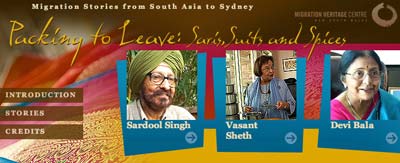
A third story is Packing To Leave ~ Saris, Suits and Spices.  This section looks at migrants to Australia from South Asia, in particular the sub-continent. They originate from India, Pakistan, Sri Lanka and Bangladesh. There are 8 video accounts that describe their experiences including the shock of the new, homesickness and the feelings of their children ~ quite often the only non-white kids in an entire school. The accounts are moving and intriguing. This material is inspiring for the students and acts as a launch pad for their own audio and video projects.

Now, I ask my readers out there, anywhere, any country, any journey… do you have any immigration stories to share with others, including my students? I would feel happy to read your own stories, those of your ancestors or friends. Please add your thoughts below.

Social network sites in the classroom
January 17th, 2008

The Economist has set up a debate between Ewan McIntosh (National Adviser on Learning and Technology Futures for Learning and Teaching Scotland) and Michael Bugeja (Director of Greenlee School of Journalism and Communication, ISU). The debating topic ~ “Social Networking: does it bring positive change to education?”

Danah Boyd wrote an excellent post reflecting on the debate. Her thoughts mirror my feelings on social network sites and their place in education. I commented on her post as follows.

‘Danah – A post that emulates my own thinking. Facebook and MySpace are not tools that can be embedded into a teaching and learning curriculum. I personally cannot imagine incorporating Facebook or Myspace into a teaching programme.There are better strategies and tactics that one can use to achieve the desired learning outcomes. Blogs, wikis and Flickr – sure, they can be used to augment learning and provide opportunities for collaboration.

As I say at the beginning of all my workshops… as a teacher I have a ‘backpack’ of tools that I draw upon to teach and foster learning. What do I find when I reach into that ‘backpack’? Whiteboard markers, exams, rulers, field trips, debates, pens, text books, metaphor, discussions, pencils, storytelling, writing responses and… technology now and then. What do I mean by technology in this case? It could include the Internet, Word, blogs, wikis and others.

Facebook and MySpace have their place in the community. I simply cannot see either of these being written into one of my teaching programmes at this point in time. Yes, technology is not the universal cure and it is not the enemy. Technology is just another tool, a way, a thing. I wish I had written your post Danah. I often relate these ideas to other teachers. I think I should write more.’

Will Richardson, whose post alerted myself to Danah’s wrote some telling thoughts on the issue of Social Network Sites as well. Will writes that he finds tools such as Facebook to be redundant with reference to the other tools that he employs. I agree.

I gave Facebook a trial and frankly it did not impress me. The ‘games’, comparatison tests, super wall stuff and the rest of it just seemed to be so puerile and a complete waste of time. Do I really care that someone likes the same movies as myself? I ask, will that knowledge assist the planet in its rotation around the sun? No, it will not. There are more significant matters in life. As I posted on my own Facebook site I felt that it was not a great tool. I have not looked at it for a while now. I could not employ this tool in the classroom. It is a great vehicle for maintaining tabs on friends near and far but right now I could not see it incorporated into my teaching programme.

MySpace is simply not for my classroom or for me. I gave it a try to and in fact I am in the midst, albeit part time, of trying to code an elegant looking MySpace page. My dislike of MySpace is well documented elsewhere in this blog yet I am willing to see what I can do with it. I dislike MySpace for a number of reasons. I find the interface to be clunky and ugly. I also believe that people waste a great deal of valuable time with their use of this social network site. The same applies to Facebook. MySpace in my teaching programme? Not yet.

On social networking sites Danah wrote, “I have yet to hear a compelling argument for why social network sites (or networking ones) should be used in the classroom. Those tools are primarily about socializing, with media and information sharing there to prop up the socialization process (much status is gained from knowing about the cool new thing).” I agree.

It really does not require that much thinking. To me it is plain commonsense. Just because it is a “Web 2.0 tool” it does not mean one has to weave it into a teaching and learning programme. As far as I am concerned any attempt to employ MySpace or Facebook in the classroom would be like trying to bash a square peg into a round hole.

Web 2.0 for the Classroom Teacher
January 14th, 2008

Sue Summerford has created this one stop shop of Web 2.o resources for the classroom. Her Web 2.0 for the Classroom Teacher page provides links to a multitude of tools, blogs, collaboration examples and more.

A quick Google search on Sue located this article that Sue wrote for EdTech magazine on the need to focus on educational objectives when selecting technology tools for the classroom.

Australians at war ~ history resources for students
January 14th, 2008

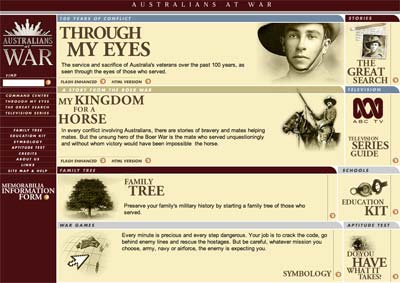
Australians at War and Fifty Australians are two sites that I share with my students when teaching the Stage 5 Australian History course in NSW. The sites are suitable for all students. They are particularly relevant to my students in Years 9 and 10 History when we explore the involvement of Australians in the various international conflicts that took place during the twentieth century.

Australians at War was created in support of an Australian documentary series that aired back in 2001 however the site has a life of its own. The richest area of the web site are the numerous video and audio recordings of the soldiers, nurses and civilians that experienced the various conflicts. There are also letters, documents and transcripts to support the embedded media. These primary sources provide a wealth of original material for students and teachers.

The web site also features pdf based resources for teachers, three games for students, an aptitude test and a page where you can construct your family’s war history. I was hoping that the family trees of other visitors to the site would be available to view however they are not.

Each component is available in a flash or html version. Some of the Quicktime media was not available however one can simply select the Windows Media Format material in that case.

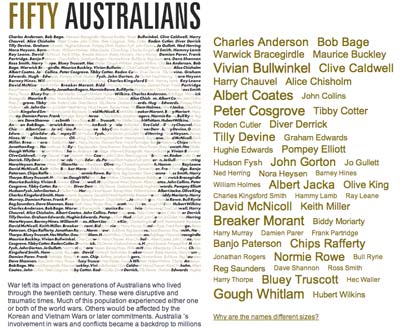
Fifty Australians is simply that. It provides biographies of fifty quite diverse Australians and how various conflicts ranging from the Great War through to the Vietnam War and beyond affected their lives. The individuals include ordinary men and women, politicians, rock stars and even rogues.

The web site has an interactive tag cloud that features the names of all fifty individuals. The font size of their name within the tag cloud reflects the number of visits to their page. Each biography is well written and features photographs and links to related resources at other web sites.

I have added links to both of these sites to the pages about my father’s experiences as a Prisoner of War and my pages for Year Nine History and Year Ten History.