Thoughts on teaching, learning, technology and life in an era of change.

Archive for July, 2008

Visit to Bulli Beach July 2008
July 30th, 2008

Last Sunday I paid a quick visit to Bulli Beach. It was a sunny morning and I was able to take a few photographs of the rocky shelf.

This post was sent to the following accounts via email simultaneously: Wordpress, Flickr, Twitter and Posterous.

See the full gallery on posterous

Posted by email from Watershed (posterous)

Addendum: The post and gallery above was more of an experiment than anything else. I set up seven digital photographs. Each was 650 pixels wide. I emailed them to my Posterous account as attachments and by using a dedicated Posterous email address I was able to simultaneously create this blog post, an elegant blog post in Posterous with a slide show, a gallery in Flickr as well as a Twitter alert. All with a single email.

The only problem that took place was that the seven photographs were each resized to a width of 500 pixels for the blog post in Wordpress. I have a narrow custom template and as a result it was thrown out a little. I manually resized each image to a width of 400 pixels. Normally I would not upload the seven images to a blog post as above so this is not really an issue for me. This feature in Posterous is not even a day old as yet and I am sure it will improve. Posterous continues to amaze.

Posterous is a brilliant blogging tool
July 29th, 2008

Posterous is a brilliant blogging tool. It is getting better each week. 

You post to your Posterous blog via email. That is possible with Wordpress and Blogger, for example, yet Posterous make it so much easier. You simply send your email to post@posterous.com. There is no need for a complex email address. You can also post simultaneously or separately to your Twitter and Flickr account. You can post to all three at once via email.

Yet, more significant than that is the fact Posterous will set up a nice interactive image gallery with your post if you add the images as attachments and email them along with your post. The image gallery is elegant. It is so easy! See the Posterous blog post example below or for real here.

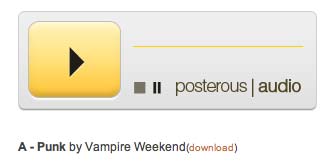
You can also send mp3 files as an attachment and it will set up a mp3 player, a link to the mp3 file. Podcasting made so easy! [Image below borrowed from Posterous faq page]

It will automatically convert urls included in the email as links. It will also automatically embed YouTube videos and similar services. All you need to do is include the relevant link in the email post to your blog. Other email attachments are added to blog posts as well with a  download link. Setting up an account is simple.

Then why am I not using it as yet? Well, I have no control over comments other than disallowing comments, allowing all comments or only allowing comments from registered Posterous users. I would love to be able to moderate comments. Other than that Posterous has a feature set I would love to see implemented in Wordpress.

Walkabout in Tiong Bahru, Singapore
July 28th, 2008

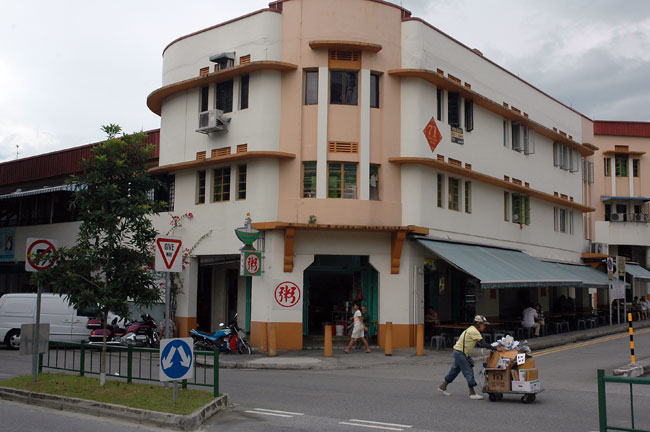
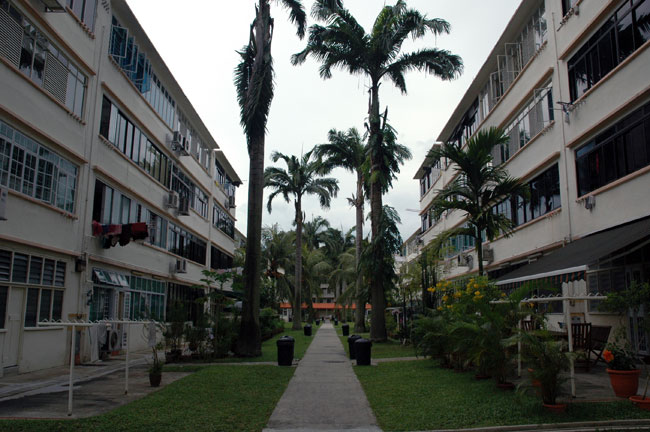
Tiong Bahru is an area of Singapore that I had not explored before. I had been to the shopping plaza adjacent to the MRT station but I had not explored some of the older areas of the town. I had often traveled past streets that I wished to wander around and during my last trip to Singapore I took the chance to pay a visit to Tiong Bahru.

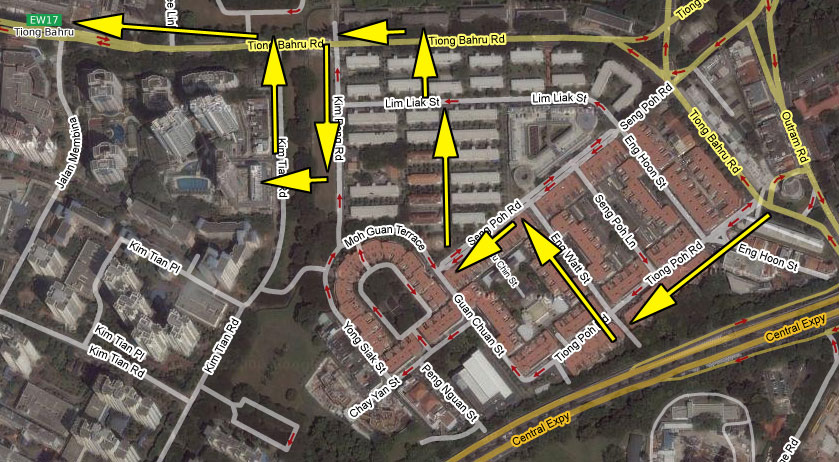
I took a number of photographs as I walked around the estate. I walked along the following roads: Tiong Poh Road, Kim Cheng Street, Lim Liak Street and Tiong Bahru Road. It is one of the oldest housing estates in Singapore. Some of the buildings date back to the 1930s and feature a mix of art deco and Straits Settlements design. I quite like the estate. There are a few estates, like Tiong Bahru, that are like little ‘islands’ that are cut off from the hustle and bustle of Singapore. They include Bukit Purmei and the Eng Kong estate.

Go to Google Maps

Multiplayer browser based Mandarin language game
July 28th, 2008

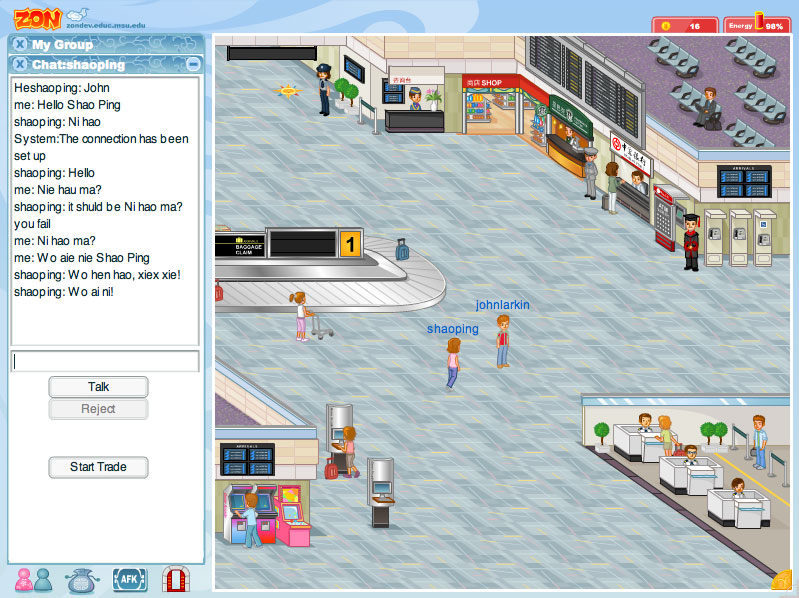
My wife Shao Ping is presently enrolled in a degree at the University of New England in NSW, Australia. She is studying Mandarin so that she can gain formal qualifications to teach the language. Shao Ping is a native speaker of Mandarin. Anyway, to day she shared this multiplayer game with me where one can practise the language. It is called Zon. I signed up a moment ago and we had a quick exchange. This was our first meeting in cyberspace. We shared a few laughs as we communicated online despite the fact we were sat next to each other, on the couch, with the cat, Sootie. My own mastery of Mandarin is not that strong.

As the welcome page for the tool indicates, “Zon is an unique interactive massively multiplayer online role playing game for learning Mandarin Chinese”. It is browser based and does not require the installation of any software. I would recommend the use of Firefox. You could probably achieve similar outcomes in Second Life but Zon is packed with numerous games and other activities that allow you to learn more about Chinese culture and the language.

The tool was developed by Dr. Yong Zhao, a Michigan State University Distinguished Professor. I am sure students of Mandarin around the world, both young and old will quite enjoy using this excellent language aid. There is a blog associated with the tool as well.

QR Codes in use at nature reserve in Singapore
July 28th, 2008

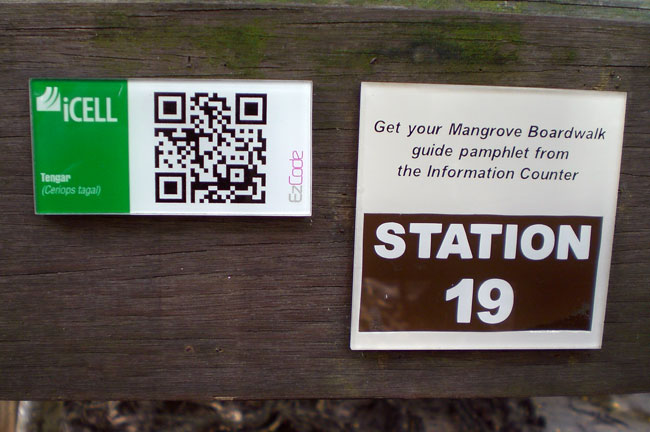
A couple of weeks ago I had breakfast over at the Sungei Buloh Wetlands Reserve in Singapore during my last visit. The reserve is a nice place to take a rest and recharge one’s batteries. I went for a walk around parts of the reserve, took some photographs, and observed that the reserve is making use of QR Codes. I have blogged about QR Codes previously here and there.

The staff have established a wireless learning trail at the reserve. Devices are made available to students so that they can access location specific multimedia data while walking the mangrove boardwalk. The portable reading device is rented to the students at $3.00SGD per student. I wonder if mobile phones equipped with QR Code reading software can also access the content?

Blog post titles are important
July 28th, 2008

Recently, a participant at one of my workshops, Gabriel, shared with me the usefulness of NetNewsWire as a feed reader. I downloaded and installed it and I have been using it for a few days now. Not bad indeed. It is a client side application for the Mac. It is a typical Mac app. When the feeds arrive they are viewed as a simple list according to the title of the blog post. An example is illustrated below. As you look at the list of blog post titles below see if you can interpret the content of each blog post.

This list illustrates the importance of a suitable title for your blog post. This is not always an easy task. The post title should be descriptive and reflective of the blog post’s content. I believe that a descriptive blog post can also assist with a Google search on that topic. Your blog post is more likely to be located and selected if the post title is representative of the post content.

Hail storm across the Illawarra
July 27th, 2008

This afternoon about 1.00PM the skies opened up and we experienced a hail storm. They are not that unusual in our region. The storm passed and there was a lull. Then there were a few claps of thunder and a second hail storm began. This was quite an intense storm.

Sootie went outside to investigate despite his initial fright with the thunder claps. He took cover under the barbecue but when the storm was finishing he decided it was all too much and raced back inside. Shao Ping and I took a few photographs and some movies on the Casio digital camera. I took a screen shot of the weather radar. The storm came up from the south.

How did I create this post and the gallery? The digital photographs in the gallery were taken with a Nikon D70 and a Casio digital camera. The video was taken with the Casio digital camera as well. I resized the digital photographs to a width of 650 pixels using Adobe Photoshop Elements. I auto corrected the colour and levels of each image. Finally each was saved using the Save for web… option in Elements. This option gives the user a great deal of control over the quality and file size of the image. I created the gallery using the Create Web Photo Gallery… command in Photoshop Elements. I converted one of the supplied templates to one that matches my web site. A little clunky but it works.

The combined file size of the two original video files was 67mb. I opened each in Quicktime Pro, added one to the other via a copy/paste and saved the combined file using the Broadband Medium setting. The size of the output file is 2.1mb.

The screen shot of the weather radar was named and saved using Sharpshooter. The image above is a collage of four of the gallery images. I created a blank Photoshop Elements file with dimensions of 400 x 266 pixels. Resized four of the gallery images to 200 x 133 pixels and dragged each onto the blank photoshop file canvas. Then saved it using the Save for web… command. I uploaded the files to my host using Cyberduck. The blog post was created using Wordpress. All of this was done on an Apple MacBook Pro 15″.

Mystery statues in Chua Chu Kang
July 26th, 2008

Back in 2001 my wife Shao Ping and I went for a walk from our flat in Chua Chu Kang to the Uttamayanmuni Buddhist Temple. It is located in Chua Chu Kang at the end of Hong San Terrace. I took a number of photographs of the temple.

There is a patch of bare ground near the temple. I sometimes wonder what was located on this ground. It is surrounded by HDB blocks, the temple and a condominium. The yellow spot on the map marks the location.

Go to Google Map

Curoiusly enough the two statues depicted in the photograph above were located on the eastern side of this bare patch of ground. Perhaps they were once situated at the entrance to another structure. Are they still there? This photograph was taken in 2001. It has been seven years. Can anyone shed any light on this at all?

Ten new photograph galleries
July 26th, 2008

Earlier this week I sorted through the photographs I had taken during my recent trip to Singapore. Ten new galleries were set up and I have just uploaded each.

I processed the images using Adobe Photoshop Elements. I resized each to a width of 650 pixels as well as adjusting the light and colour in some instances. Finally I used the Create Web Photo Gallery command in Photoshop Elements to create the web galleries. I had taken one of the gallery templates supplied with Elements and modified it to fit in with my existing web site. All of the links are taken care of and I simply drop the folder that is created on to my server. I also add some text to the index.html file for each gallery.

Click on one of ten thumbnails below or any of the links listed beneath the image to view the gallery.

The galleries created are as follows:

St Joseph’s Institution (Primary) Workshop
Nanyang Technological University Workshops
Mac Meetup
Tiong Bahru
Kranji
Queenstown
NTU Campus
Tai Pei Eating House
Sungei Buloh Wetland Reserve
Various points around Singapore 

Before and after
July 26th, 2008

Before

After