Thoughts on teaching, technology, learning and life in an era of change.

Archive for the ‘ History ’ Category

Aerial archaeology
February 28th, 2010

One of the topics covered during the Preliminary Ancient History course in Year 11 is the work of the archaeologist. A subset of that is aerial archaeology. The combination of flight and photography has provided archaeologists and historians with a valuable tool. How valuable?

Aerial photography allows the archaeologist to view entire sites and also to recognise features that may not be clearly visible at ground level. Soil marks, crop marks and shadow marks are visible via the technique. Buried structures and slight, yet regular, undulations in the land can be revealed. As a result structures that have been ‘lost’ or forgotten over time reveal themselves to the researcher.

Aerial archaeology
Remote Sensing and Archaeology Project
Aerial photo analysis and survey – GIS and Remote Sensing for Archaeology: Burgundy, France
UK Aerial Archaeology
Classics and Ancient History – Aerial archaeology in Jordan Project - Archive PageFlickr Sets
Aerial Archaeology Flickr Group
WIkipedia – Aerial Archaeology
Wikimedia Commons – Aerial Archaeology Photography Category

Soil marks
Learning Archaeology: Pre-Ex: Aerial Photography: Parch Marks and Soil Marks

Crop Marks
Learning Archaeology: Pre-Ex: Aerial Photography: Crop Marks

Photograph acknowledgement. The picture above is ©Copyright Civertan Grafikai Stúdió (Civertan Bt.), 1997-2006.; http://www.civertan.hu/. It is released under a Creative Commons license (Attribution-ShareAlike 2.5 and older).

Additional archaeology links can be found on this page on my main site.

Exploring sources in history via digital storytelling 2
April 4th, 2009

Earlier today I posted about a project designed to encourage students to gain an understanding of how sources in history can be utilised to build an argument or an account relating to an event, personality or period in history.

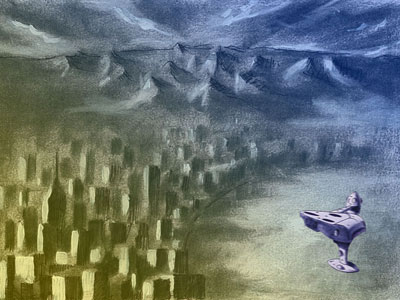
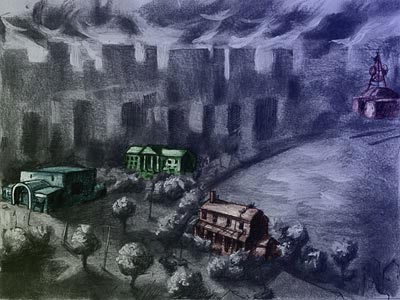
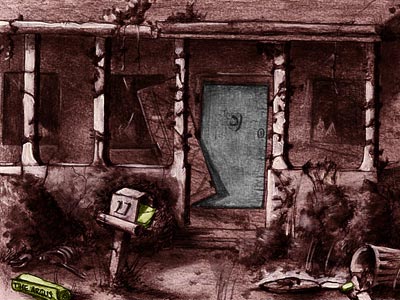
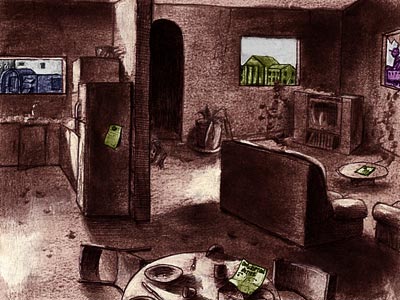
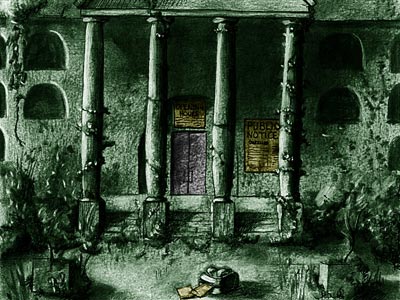
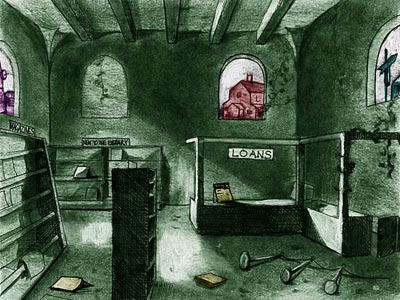
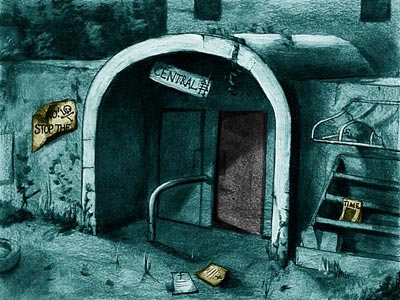
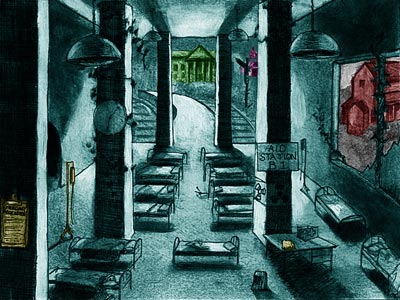
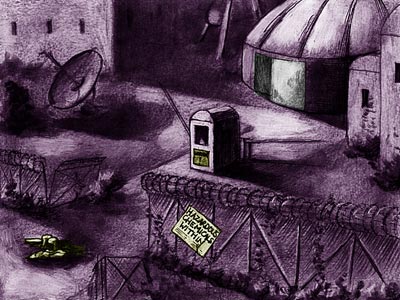
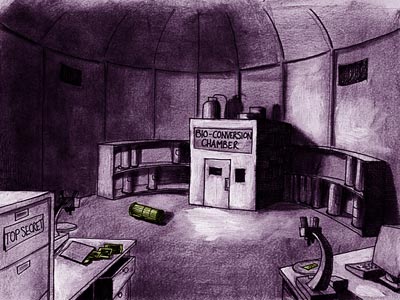
Back in 1996, together with artist Nathan Simpson, I created a fictitious landscape back that is bleak and empty of human life. The object for the students was to gather a variety of clues and piece together what has happened. I have reworked a few more images from the project and smaller copies of the same are displayed below together with those also posted earlier.

How would you use these images? A wiki? A blog? A dedicated web site? Allow the students to take the images and rework them and add additional clues?

The completed project will include additional images that depict the embedded clues in an enlarged format.

Simply based on the images shown below what do you think befell the denizens of this landscape?

Opening scene

Closer view of the town

Exterior view of house

Interior view of house

Exterior view of library

Interior view of library

Exterior view of metro rail station

Interior view of metro rail station

Exterior view of research laboratory

Interior view of research laboratory

Exploring sources in history via digital storytelling
April 4th, 2009

Opening scene to “Hunger City” [1996][Large][Original]

Back in 1996 I created a HyperCard stack titled “Hunger City”. It was inpired by two factors. The first was David Bowie’s introductory sequence to the album Diamond Dogs, entitled Future Legend. The second factor was to create a tool that would allow students to explore a range of different types of evidence and then draw their own conclusion. This is a skill required of students in the study of history. They examine the various historical sources, look for accuracy, bias and the like and compose their views regarding the event, personality or subject matter. Science fiction crept into the story for this project as well.

I enlisted the assistance of a former student for this project, Nathan Simpson. I taught Nathan Introductory French language when he was in Year Eight back in 1987. Later I managed the school rock band, The Evicted, in which Nathan was the bass player. Nathan is an excellent artist and over the years we have collaborated on a number of projects. Nathan is an accomplished artist and worthy of your exploration. I shall be MC at his wedding later in the year.

I took Nathan’s original black and white sketches, that were created using pencil, ink, charcoal and toothpaste and reworked them using Photoshop.

Nathan created the original artwork for this HyperCard stack. We sat down together and I shared my storyboard ideas with Nathan. The vision was for a bleak city of the future without human survivors. I am resurrecting the artwork for an online version of the activity. I am reworking the graphics and updating the embedded evidence.

Key navigational elements in “Hunger City” [1996][Large]

When students explored the HyperCard stack they were able to collect “clues” and make notes. The desolate city that was the underlying metaphor for the ’story’ featured four areas that were enriched with clues: House, Library, Metro station and a Research Lab. The objective for the students was to determine what had happened to “Hunger City” and report back. I am updating this process with current tools in mind.

So, using the evidence presented in just the two scenes above what do you think happened to the denizens of “Hunger City”? There are many more scenes in the pipeline.

I am thinking of renaming “Hunger City”. What would you name this place? Mortopolis? The Place of the Dead? The Bleak?I would be happy to read your ideas.

What’s your story?
March 29th, 2009

A number of years ago I attended a workshop conducted by Kym Nadebaum in which he shared an approach to storytelling using a combination of stills, audio and video. The group utilised tools such as iMovie, Garageband, Audacity and others. It was most enjoyable.

I was quite familiar with the tools yet it was simply a great opportunity to meet up with other teachers from across Australia and New Zealand. Had a thoroughly good time. Kym Nadebaum is a great presenter and a dedicated educator.

I produced a short clip about my father Francis Xavier Larkin Snr, a former prisoner of war. I include it below. Download the clip.

Getting started with Web 2.0 presentation
March 26th, 2009

Tomorrow I am giving a presentation as part of the Thinking Globally, Delivering Locally VC Seminars being jointly conducted by the Macquarie ICT Innovations Centre at Macquarie University and the New South Wales Department of Education and Training.

As they point out on their web site the Macquarie ICT Innovations Centre is hosting the seminars to provide regional and isolated schools with access to innovative technologies. I received an invitation from Anne-Maree Moore, Project Manager Collaborative Technologies at the centre to participate in the Thinking Globally seminars.

The focus of my presentation is Getting Started with Web 2.0 Technologies. During the course of the presentation regarding classroom implementation of Web 2.0 technologies I plan to emphasise three points.

1. Choose an aspect of the curriculum with which you hold a passion.

2. Choose an online tool with which you feel comfortable or ‘clicks’ for you.

3. Steer a simple, straightforward path at the outset.

As well, timing is also important… For example I find term III is favourable moment when the pressure is off somewhat. No final exams and no reports to write. [Actually these ideas apply to any technology based curriculum integration, not just Web 2.0 technologies. Some of my ideas are available in this document containing notes, ideas and some brainstorms.]

Why do I give this advice? By following these simple rules of thumb a teacher new to technology will be able to ease themselves into the process gently. Being familiar with the curriculum component enables the teacher to focus on the implementation and the technology. Selecting a technology that they are comfortable with serves to ease the burden with the actual implementation. A simple beginning provides a a practical and commonsensical framework for the implementation to be effected.

I base this on experience, pure and simple. It may not have been Web 2.0 but back in 1992-1993 the tool that clicked for me was Apple’s HyperCard. I was given a quick demo of HyperCard by Dr John Hedberg, during a promotional presentation for a new course being offered by the University of Wollongong. John was teaching at the Faculty of Education at the university and he was a member of the famous Interactive Multimedia Learning Laboratory, now EmLab. John is now Professor and Head of the School of Education at Macquarie University.

John’s demo of HyperCard in addition to the other components of the presentation convinced me to enrol in the Graduate Certificate of History Education at the UOW. In addition to the pedagogical components the course included a technology subject that introduced the students to multimedia programming and educational technologies. It was brilliant. It changed my life.

I chose an area of the curriculum that held my passion. The Pacific War. In particular the unit on Australian prisoners of war. My late father, Francis Xavier Larkin Snr, had been a guest of the Imperial Japanese Army (IJA) across various parts of Asia from January 1942 through to August 1945. My father had shared with me his letters, photographs, relics, maps and other documents from that period. This was an area that fascinated me, personally and professionally. I created a curriculum matrix at the time.

I scanned the documents using an Apple Scanner, a Mac Classic and a HyperCard stack that acted as the interface. I created a HyperCard stack that incorporated the documents and my father’s recollections that I had recorded on to cassette tape and then later digitised on the Mac. I bought a Mac LCIII.

Main menu of the Prisoner of War HyperCard stack.

Entry point for Photographs 1940 to 1942.

Photograph of my father taken in 1944 by the IJA. Clicking on the play button allowed the listener to hear my father’s thoughts regarding the photograph.

HyperCard was an excellent tool. It introduced programming to the masses. Once I had figured out the navigation and the ’stack map’ developing the stack, card by card, was straightforward. It was an enjoyable process and provided myself with a real sense of achievement. When it was completed I placed it on a server at school with the help of two colleagues, Ken Orrock and David Emery.

My Year Nine students could access it to complete a number of activities. They were amused by the fact that they were attending History lessons in the computer laboratory. During subsequent years I wore a second hat at school and taught students how to create HyperCard stacks as part of their Design and Technology course. I made other stacks on Kite Flying, the Iceman and a simple game about the end of the world called Hunger City. That stack taught students about the importance of collecting appropriate evidence when creating a historical argument.

I actually racked my brain repeatedly for a topic that I could use as the foundation for my first HyperCard stack. Various topics crossed my mind. One evening when I was going through my father’s relics it dawned on me. My father’s wartime experiences were the perfect topic. I had an interest in the topic and by scanning the letters, relics and photographs and by creating the stack I was able to share the relics with the students without fear that the original relics would be lost or damaged. The students could access the materials on the server via the stack. It was a great solution. I have since created a web site that feature my father’s relics.

So, my journey into educational technology began with a topic for which I had a passion, a piece of technology that clicked and a reasonably straightforward beginning. It was a good experience. I enjoyed it. The students enjoyed it. It reinvigorated my passion for education. I had reached a point in my career where I was basically teaching within a reasonably secure comfort zone. That HyperCard stack took me outside my comfort zone and set me on a journey that continues to this day.

Well, time has passed and not long back I wished to set up some blogs for my middle secondary History students. What steps did I take?

First of all I did some investigation. I began with a simple Teacher~Class blog in which problems and questions were posed by myself and the students responded via comments. I utilised Blogger as the tool. I would utilise eduBlogs now.

Actually, thinking back I had a blog of my own for a while before creating a teacher-class blog. By working with my own blog I gradually understood how they worked. I gained an understanding of the positive characteristics of the blog and also the pitfalls.

Then, how about blogs for each student? This was a significant task. I considered some of the educational blogging services but discovered, for example, that once I had exceeded 50 student blogs, that fees kicked in for the school. In other cases there was a lack of control. How could one set up multiple student blogs? Well this is how I did it. This time.

I wanted my middle secondary students to compose online diaries as if they were living through the Great Depression and/or the Second World War. I explored some blogging possibilities and I went with Blogger. I set up the Blogger accounts for each student. That took up some time. I created a simple initial welcome post in each blog.

I created a sample blog that illustrated the sort of product that I would like to see the students begin with as they started blogging. I was then hoping that they would become more creative as they proceeded with the blog. The next day in class I asked the students to list their student email accounts in turn in a spreadsheet. I showed them the sample blog and how they would need to post a blog entry. I invited each student to pick a template for their blog as well. I invited each student to be an author of their blog. I would be the administrator.

The following day I had booked the students (two separate classes) into two separate computer labs at school to begin blogging. There were some technical problems but all of that was sorted and a subsequent visit was more fruitful. The holidays then intervened. I was away as well and now that the fourth term has commenced I shall encourage the students to start blogging again. I have a role to play there.

I am notified of each blog post via a RSS newsreader. Comments will come to me via email for vetting.  Just for now I just wish to see the students enjoying the process of creatively writing via a different medium. They understand why I have set up these safeguards. The students began their blogging with mixed results and about a dozen have really sunk their teeth into the project. many of the students have only made one post. Squeezing this project within the normal programming of the subject is challenging but I am getting there, gradually. I have added some screen shots below.

From a historical perspective it is interesting as the blog entries are sprinkled with dating errors, anachronisms and other anomalies.  They provide a source of fruitful analysis when the students share their blogs in class.

For tomorrow’s presentation I shall point the participants to the following resources…

Web 2.0 links and resources: Here you will find online guides and resources for applications and tools as diverse as Twitter, Second Life, Wikis and more. There are links to classroom blogs, wikis, Second Life sites, teacher blogs and a variety of advice from educators near and far. I have just updated the list with additional Nings and Twitter resources.

How to guides. This page is chock-a-block full of pdf guides to blogs, wikis, Twitter, RSS feeds, Posterous and much more. Feel free to download and use these guides. Worpdress has just been updated so that guide is a little out of date. I have also added these resources to my home page.

Blogrolls. These are some of the blogs that I read some of the time, not all of the time. This needs updating. Need to import my latest OPML file into Google Reader.

I have also uploaded four rough edits of an interview recorded by Nanyang Technological University. Four questions were answered.

Click on each question to view the relevant video. You will need to ensure you have Quicktime installed.

What is Web 2.0?

How can teachers and students exploit Web 2.0 technologies for teaching and learning?

How can teachers benefit from web 2.0 technologies?

How can students benefit from web 2.0 technologies?

A number of useful tools:

Wordpress blog: hosted by Wordpress | hosted by yourself

Flickr

Creative Commons

Compfight

Posterous

Twitter

Remember, before embarking on a dedicated implementation of technology as part of your curriculum consider your existing workload and the demands that are made upon your time on a daily basis. Some time is required to make changes to your programming and the strategies that you employ in your teaching. Allowing for this time should not be a burden.

Choose a part of the curriculum which holds a particular interest for you. Select a technology that clicks for you. Do not re-invent the wheel. If other colleagues or teachers elsewhere have also established similar implementations within the curriculum then drop them a line and seek their advice or assistance. Perhaps you could collaborate. Take small steps, one after the other. A simple, straightforward path. Nothing too extravagant or burdensome.

And something I have neglected… tap into the skills of your students. Allow the students to assist as appropriate. Empower the students.

The journey should be pleasant. An opportunity or professional growth. An opportunity to stretch. An opportunity to be observed in a different light by your peers and your students.

What steps have you taken in the past? What steps will you take in the future? Please share them below if you wish by adding a comment.

[This post was created via an amalgamation of earlier posts, the inclusion of new material and republished for the benefit of participants in tomorrow's presentation.]

Grab that YouTube video via a single click
February 28th, 2009

Australian War Memorial YouTube Channel

I discovered that the Australian War Memorial has its own channel on YouTube the other day when doing some research on the Vietnam War for a series of lessons designed for my Year 10 class. I showed the students a variety of video clips focused upon the Vietnam War. The clips were authored by war enthusiasts, students, news media outlets and several by the Australian War Memorial. I asked the students to compare the clips in terms of credibility, bias, usefulness and accuracy. Honing their Internet research skills and capacity for critical thinking, methinks.

This week several colleagues dropped by my desk with questions about PowerPoint and embedding video. Each had a different problem. It is a little weird when staff possess identical laptops and operating systems yet PowerPoint and video behave differently. Well, not that weird really. Typical if anything. That is another story.

I wanted to find an easy way for my colleagues to download the high quality video from YouTube that they could insert into their PowerPoint presentations, etc. From time to time one hears of different methods to download YouTube videos. MacUsers may like to use Tooblehttp://tooble.tv/

But then there is this nifty little button or “bookmarklet” that you can drag to your browser’s toolbar. It is located at this page on the GoogleSystem blog. This is “old news” but good news. Simply click and drag the rectangle that states “Get YouTube Video” to your browser’s toolbar and that’s it. Simple, elegant.

Get YouTube video bookmarklet in situ

Next time you visit YouTube and locate a video that meets your needs click on the “Get YouTube Video” bookmarklet on your browser’s toolbar. A download of the high quality version of the video will commence. The downloaded file will be in .mp4 format. The video will launch once the download had completed. You will need to rename that file. Each download has the same generic name which is “video.mp4″. The video will insert within a PowerPoint presentation.

A tweet from Pompeii 79AD
February 21st, 2009

Source: Historical Tweets

A post by Francesca Tonchin in Classical Archaeology News just alerted me to Historical Tweets. The specific tweet relates to the eruption of Mount Vesuvius in 79AD and the consequent disaster that befell Pompeii, Herculaneum and other regions of Campania. [This event and the societies of Pompeii and Herculaneum are a core unit of the Ancient History course in the New South Wales Higher School Certificate.]

The idea generated some thought and made me wonder about other possible applications such as “Famous Last Tweets”. Imagine asking students of literature, during a break or diversion in that programmed syllabus, to compose tweets that would have been written by writers such as Plato, Lawrence, Dickens, Twain, Pepys, Shakespeare, Orwell, Donne, and so on. I believe John Donne’s tweets could have been particularly telling…. “This bed has fleas…” or “Just picked up a nice compass“.

Care to suggest others?

The bombing of Darwin 1942
February 19th, 2009

On the 19th February, 1942, the city of Darwin in Australia’s Northern Territory was bombed by Japanese military aircraft. Two bombing raids took place. It was just four days after the fall of Singapore. The bombing raids were led by the same commander that presided over the attack on Pearl Harbor on the 7th December, 1941.

At least 243 people were killed during the raids. The casualty list published in newspapers at the time was much lower so that the Australian public would not be alarmed and panic. This bombing raid was followed by countless more at various points across Australia’s northern coastline. Towns such as Exmouth, Broome and Townsville were bombed during this period. 

There are some informative resources regarding these attacks that teachers and students would find useful. There is Australia Under Attack at the anzacday.org.au site. This section is a subset of the Battle for Australia component of the site. There are a number of photographs that educators and students can also freely use as long as they acknowledge the Australian War Memorial. One such image from the web site is displayed below.

AWM 026977 Damaged RAAF hangar. A Douglas dive bomber lies in ruins.

The Australian War Memorial also has a valuable suite of resources including the article, Australia bombed, strafed and shelled. It incorporates a map illustrating sites that were attacked around the Australian coastline. Of course you can always conduct a search for resources at the Australian War Memorial.

The National Archives of Australia have some great primary sources, including newspaper reports and various original documents of the event.

Additional resources and sites:
The Japanese bombing of Darwin and northern Australia
Photographs of the bombing of Darwin
Bombing of Darwin ~ Wikipedia

Please feel free to suggest more resources by posting a comment.

Jingoism and racism rears its ugly head again…
January 29th, 2009

Let me begin this post with with a little of something I wrote back in 2005…

20 years from now history text books will set out Pauline Hanson, Howard, Ruddock, Vanstone and Downer together with their US inspired politics of fear and a jingoistic approach to foreign policy as the background causes for the riots at Cronulla and Maroubra. Ten years of conservative Liberal Party government, the shame that is Pauline Hanson, jingoistic foreign policies, inhumane immigration detention centres, the baby overboard debacle, illegal deportations, and the jewel in the crown… the Cronulla Race Riots.

Historical personalities like Howard, Downer, Vanstone and Ruddock espousing right-wing, nationalistic, pro-individual, selfish policies to the detriment of community and collaborative social values have their parallels in Nazi Germany as well.

Welcome to Australia… only if you are fair-skinned, sandy-haired and blue-eyed of course. You must promise to vote for the Liberal Party as well, just like the majority of Cronulla’s residents. Australians of a caucasian background no longer seem to make immigrants and visitors of other racial backgrounds welcome. I first started observing this in 1996 or thereabouts.

It is so shameful to be an Australian now. This episode and the malaise that seems to be infecting Australia and its people makes me feel angry, frsutrated and sad. It seems to be vote ‘1′ for individualism and selfishness in this country.”

Well, it is January 2008 and things have not improved all that much. Imbeciles not unlike those that run amok in Cronulla in December 2005 have rioted and fought at a variety of towns along the NSW coast this week. It was Australia Day ~ our national day. There was shameful behaviour at Manly, Shellharbour, Kiama, Wollongong and Thirroul. A number of the imbeciles were draped in Australian flags. They were engaged in drunken, riotous behaviour. Asian eating outlets in Manly were targeted by these racists. These racist idiots should be locked up and the key thrown away. As one observer wrote they are all morons.

I was hoping that with the demise of John Howard and the Liberal Party 15 months back that the situation in Australia would improve. It has not.

The Australian flag has become a symbol of racism. Those drunken, pathetic, ignorant and shallow individuals that drape themselves in the flag or paint it on the back of their utes are racists. It has become a symbol of exclusion. It has become a symbol of the bully. They may as well be holding a banner proclaiming “If you are not white and of an anglo-centric background then you are not welcome!” The term “Aussie pride” is a catch-cry for all intolerant individuals in this country. Shame.

Even if these racists represent less than 0.10% of the population of this country then that is 0.10% too many. Morons, imbeciles and idiots. All of them.

Related links:

Brawls mar Australia Day
Manly mob rampages through Corso
Manly ‘morons’ rampage was racist: academic
Riot police called to ugly Oz Day celebrations
Oz Day marred by brawls and booze

Teaching World War One?
January 27th, 2009

Gateway to Tanilba Bay

During a recent holiday on the north coast of NSW my wife Shao Ping and I stumbled across Tanilba Bay. This small town is located on the Tilligerry Peninsula  and is part of the Port Stephens region. We explored the town and discovered that a significant number of the streets had been named after individuals and facets of World War One.


View Larger Map

Street names include Lloyd George Grove, Clemenceau Crescent, Diggers Drive, Avenue of the Allies, Conquest Crescent, Navy Nook and Pershing Place.

Development Plan

The town plan consists of concentric circles. I believe that there were hopes that the town would become a significant centre on the eastern seaboard of Australia. There was a historical display near Tanilba House that included images of the original development plan from the early 1930s.

Tanilba House

This interesting and attractive little town could form the basis of a research assignment for a history class studying World War One. Who planned the town? Why did they choose those particular street names? Who was Pershing? What was a Pershing boot? Who was Clemenceau? Whey do we remember them? How is the Great War remembered in your town?

Okay fellow history teachers…. here is my challenge for this week. How would you use this knowledge of Tanilba Bay in your teaching of history? I am thinking of asking my students to design a town that utilises a different historical event as the basis for the nomenclature within the new town.

Work sounds ~ the sounds of working
January 23rd, 2009

Stills from “How Quiet Helps At School” Coronet Films [Prelinger Archives]

Is your class characterised by the presence of “work sounds”? Not sure? In that event I recommend that you watch this informative film “How Quiet Helps At School“. This instructional film was produced by Coronet Films with advice from Dr. Henry Bonner McDaniel, a professor at Stanford University and the first director of guidance and counseling for the California Department of Education.

The films compares and contrasts two different classrooms. During the investigation of the second classroom a number of classroom management strategies are shared with the audience.

Some of the baby boomers that occasionally read this blog should look closely. Perhaps you are in either or both of these two classrooms.

Two historic gems from the past…
January 19th, 2009

The Internet Archive has an abundance of resources useful for history teachers, students of pop culture and media studies researchers. The resources are diverse in terms of media type and content. On and off during the last few days I have explored films relating to the assassination of JFK, Cold War propaganda, the dawn of the atomic era and instructional films from the 1940s and 1950s.

The archived films, for example, are particularly useful. It is possible to watch the films from within the browser yet links are provided that enable the researcher to download the films in a variety of formats including Cinepak, Ogg Video, MP4, Real Media, MPEG2. Embed code is also provided for the researcher. The embed code did not, however, work with this blog. Not to worry, as I downloaded the films to share with my students anyway.

The short films could be utilised to introduce a topic, generate argument, raise questions and act as the focus for a project. Students could download a sequence of short films on a particular topic, Cold War propaganda for example, and remix their own mash-up or documentary based on the material.

Stills from The Eleventh Hour [Film Chest Vintage Cartoons]

Two favourites of mine from the archives include a Superman cartoon from 1942 as well as the famous instructional film, Duck and Cover. In The Eleventh Hour Superman is busy destroying ships and military installations in and around Yokohama. He commences his acts of sabotage at 11.00PM each night. He also rescues Lois Lane who is also present in the city. Why she and Clark Kent are present in Yokohama at that particular time is not so clear.

The Japanese foe is depicted in a racially loaded and demeaning manner. As one commentator on the site pointed out it is interesting to see Superman wreaking destruction as opposed to saving the planet. I saved a copy of the film in MP4 format. One can also stop the film at specific moments, right mouse click on that frame, select ‘Copy” and save the individual frame for later embedding in a support document or web site for the students.

Stills from Duck and Cover [The Prelinger Archives]

The other, Duck and Cover, is a well known civil defense short film from 1951. Burt the Turtle gives advice on how you and I can survive an atomic attack. Sure, you can survive an atomic blast! Watch it and be amazed at what the general public and students were taught regarding atomic warfare. I usually show the students this film in conjunction with clips illustrating the destruction at Hiroshima and Nagasaki as well as the impact of the underwater atomic test at Bikini Atoll during Operation Crossroads.

These are just two of the thousands of films in the Internet Archive. Some are shocking, others simply amusing yet all are informative.

Amazing Stockton Beach, NSW
January 17th, 2009

Stockton Beach sand dunes, looking south.

Earlier this week Shao Ping and I had the opportunity to explore Stockton Beach, south of Port Stephens in NSW. The sand dunes of Stockton beach stretch for 32 kilometres and in some areas reach 1 kilometre inland.


View Larger Map

We explored the dunes late one afternoon and then went on an organised tour the following day. The dunes are moving approximately 4 metres in a northerly direction each year.

Northern end of the dunes near Anna Bay.
Tank traps are visible in the foreground.

The dunes feature tank traps that were constructed to deter an invasion by the Imperial Japanese Army during the Second World War.

The dunes can be as high as 30 metres.

The earliest inhabitants of this region were the members of the Worimi Aboriginal tribe.  The middens created by the tribe during the previous 12,000 years can be seen at many points along the length of the beach. The middens appear and disappear with the ever shifting sands.

Tin City

As well there is the intriguing Tin City. This is a collection of shacks that had their origins during the Great Depression. They were built and occupied by impoverished Australians. The shacks made way for an army camp during the Second World War and were rebuilt after the war. At this time four men still live in the remaining shacks. They were utilised as a set during the Mad Max movie. It is hard to believe that individuals could live in such an environment. They utilise solar and wind power as well as a groundwater supply. Keeping out the sand must be an ongoing challenge for the four inhabitants.

Guess who?

If you are ever in the Port Stephens and Newcastle region of NSW the Stockton dunes are well worth a visit. Shao Ping and I certainly had a jolly good time. I have uploaded a gallery of photographs of the dunes to my main web site.

Battle of Thermopylae 480BC
December 15th, 2008


View larger image

This is an ancient aerial photograph taken just before the final stages of the historic Battle of Thermopylae between the Greeks and the Persians in 480BC. The image was taken by Anna Chronism. The Greek forces were courageously led by Leonidas. The troops are camped by one of the ancient walls of the pass. To the right the traitor Ephialtes can be seen.

How was this post created? The original photograph was taken using a digital camera. Mt Faber, Singapore, 2003. The ants were building a wall of sorts prior to a storm on a step on a path. Were they intending to funnel water towards or away from their nest I wonder? Why were they building a wall? Was the impending storm their version of an invading Persian force? I imported the photograph into Comic Life. The cartoon elements were added. I exported the project as an image. Opened it in Photoshop Elements and saved the image for the web. Large and small.

Google Earth discoveries
November 23rd, 2008

Google Earth and its browser based cousin Google Maps fascinate. This morning I read that a possible meteorite crater has been discovered in western New South Wales. The report in the Sydney Morning Herald tells the story of opal miner Mike Fry and how he spotted the crater via Google Earth. Mr Fry had been using Google Earth to explore terrain for possible opal mining sites. The site requires further geological investigation to confirm it is the result of an meteorite impact. The western rim of the site is visible. The eastern rim has been significantly eroded and is no longer visible.


View Larger Map

Earlier this year another potential impact crater was discovered in Western Australia by Dr Arthur Hickman, a government geologist with the Geological Survey of Western Australia.


View Larger Map

If you are interested in similar discoveries and meteorite craters around the globe this Google Earth Hacks site, Craters [scroll down], and this Google Maps site, Meteor Craters may interest you.

It fascinates that both of these geological ‘discoveries’ were made whilst seated in front of a computer display.

Have you ever made a ‘discovery’ while exploring Google Earth or Google Maps. Some time back I was exploring some of the towns where my wife and I had lived while we were living in Singapore. To my surprise I ‘discovered’ that a group of trees that were located in a park that was adjacent to our estate spelt out the name of the town, Pasir Ris. We had walked through and around the park many times yet we never realised that the trees had been so planted.


View Larger Map

In the classroom I like to use Google Earth to support the teaching of history. It is particularly useful when teaching students the history of the Persian Wars. Sites for battles such as Marathon, Salamis, Thermopylae and Artemisium are all accessible. Of course the terrain and coastlines have altered to some extent yet the maps provide an invaluable viusal for the students and it makes the events all the more tangible.


View Larger Map

Battle of Marathon site. Athenian soldiers are buried in this mound.


View Larger Map

Both the Battle of Thermopylae and the naval battle of Artemisium were fought in this region.


View Larger Map

The Battle of Salamis was fought in the narrows between the island of Salamis and the coastline of ancient Attica

So, have you made any “discoveries” using Google Earth? What do you think are some of the more interesting locations visible via Google Earth? How do you use Google Earth in the classroom?