Thoughts on teaching, technology, learning and life in an era of change.

Archive for the ‘ Technology ’ Category

Two historic gems from the past…
January 19th, 2009

The Internet Archive has an abundance of resources useful for history teachers, students of pop culture and media studies researchers. The resources are diverse in terms of media type and content. On and off during the last few days I have explored films relating to the assassination of JFK, Cold War propaganda, the dawn of the atomic era and instructional films from the 1940s and 1950s.

The archived films, for example, are particularly useful. It is possible to watch the films from within the browser yet links are provided that enable the researcher to download the films in a variety of formats including Cinepak, Ogg Video, MP4, Real Media, MPEG2. Embed code is also provided for the researcher. The embed code did not, however, work with this blog. Not to worry, as I downloaded the films to share with my students anyway.

The short films could be utilised to introduce a topic, generate argument, raise questions and act as the focus for a project. Students could download a sequence of short films on a particular topic, Cold War propaganda for example, and remix their own mash-up or documentary based on the material.
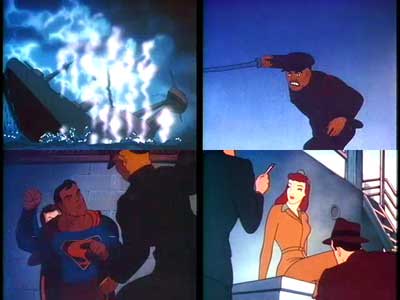
Stills from The Eleventh Hour [Film Chest Vintage Cartoons]

Two favourites of mine from the archives include a Superman cartoon from 1942 as well as the famous instructional film, Duck and Cover. In The Eleventh Hour Superman is busy destroying ships and military installations in and around Yokohama. He commences his acts of sabotage at 11.00PM each night. He also rescues Lois Lane who is also present in the city. Why she and Clark Kent are present in Yokohama at that particular time is not so clear.

The Japanese foe is depicted in a racially loaded and demeaning manner. As one commentator on the site pointed out it is interesting to see Superman wreaking destruction as opposed to saving the planet. I saved a copy of the film in MP4 format. One can also stop the film at specific moments, right mouse click on that frame, select ‘Copy” and save the individual frame for later embedding in a support document or web site for the students.
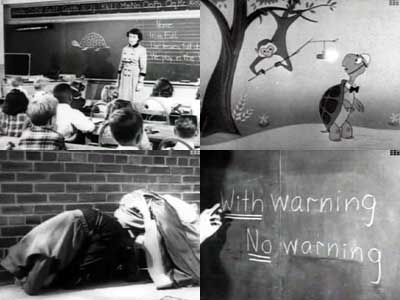
Stills from Duck and Cover [The Prelinger Archives]

The other, Duck and Cover, is a well known civil defense short film from 1951. Burt the Turtle gives advice on how you and I can survive an atomic attack. Sure, you can survive an atomic blast! Watch it and be amazed at what the general public and students were taught regarding atomic warfare. I usually show the students this film in conjunction with clips illustrating the destruction at Hiroshima and Nagasaki as well as the impact of the underwater atomic test at Bikini Atoll during Operation Crossroads.

These are just two of the thousands of films in the Internet Archive. Some are shocking, others simply amusing yet all are informative.


Yes! The Digital Natives debate is alive and well…
January 8th, 2009

I am always happy to see the Digital Immigrants~Digital Natives debate back on the front page of blogs. I remember reading Marc Prensky’s original article that proposed the immigrants~natives idea when I was an instructional designer with the now defunct eLearning company ICUS (it was acquired by Academee). I was designing eLearning sites for Nokia and Singapore Airlines back then.

The other day Chris Betcher shared a range of views on this debate that echo my sentiments exactly. Beautifully. Please head over to his informative Betchablog to consume his well composed thoughts.

As I commented over on Chris’ blog this immigrants~natives debate is a recurring theme for me. My return to the classroom was an anti-climax in many respects. I was hoping to achieve wonders with the students following my technological sojourn at university and whilst working in Singapore.

I was surprised to find that the secondary school population was not overflowing with digital natives hungry for cutting edge challenges in a digital sense. In fact there was and is a sizable group that just want notes on the board and to be told what to study for in the exam.

I once wrote a post concerning the premise that adults, including teachers, are “Digital Immigrants” and that the students that we teach are “Digital Natives”. This terminology was coined by Marc Prensky some time back. I have used the terminology on a number of occasions myself. During the last couple of years, having worked closely with secondary school students, I have begun questioning the premise that underlies the terminology. In that original post I concluded that “perhaps they are not Digital Natives at all but simply Digital Dilettantes… they are, and I quote from a dictionary, an amateur or dabbler; especially, one who follows an art or a branch of knowledge sporadically, superficially, or for amusement only.” 

I would like to complement Chris’ thoughts with my own and to that end I reproduce some of the words I had put down back then…

“Last Saturday David Thornburg wrote a post where he expresses regret that he had utilised the terms in the past. He also wrote that the terms were demeaning to educators. As he points out it is true that today’s students have grown up in a world where computers are reasonably ubiquitous but one cannot assume that this fact makes the students any more tech savvy than their teachers, or parents, for that matter.

The author of the Connectivism Blog has written an article critical of Marc Prensky’s position. He picks up on David Thornburg’s apology regarding the terminology as well. I cannot do it justice here. I strongly recommend that all interested parties read his views. He concludes “…aside from insulting an entire generation and coddling to the needs of younger learners, Prensky doesn’t provide us with a compelling model forward (other than “use digital games”).”

The author also makes a reference to “technology weariness” and “resistance to technology” among educators. He adds that hyped-up educational technology that fails the promise to deliver will only hurt future applications of these processes in teaching and learning.

I am now going to read Jamie McKenzie’s critique of Marc Prensky’s position in his article, “Digital Nativism, Digital Delusions and Digital Deprivation.” Jamie sets out, point by point, his views regarding Marc Prensky’s position.

Readers may think it curious that a teacher that readily incorporates technologies in the teaching and learning curriculum should post articles that seemingly go against the grain. Many major speakers and evangelists preach the premise that our students are the “digital natives”. I do not believe that we can make this blanket assertion for all students. I am a not alone in this belief.

I believe in a pragmatic and commonsense approach to educational technologies. [This is beginning to sound like a creed]. I have seen hundred of thousands of dollars pumped into multimedia and eLearning projects that are now idle. I have seen revenues in excess of six figures devoted to eLearning projects that are now obsolete (in under five years). I feel that is such a waste. I am yet to crystallise my approach but I essentially believe that educational technologies must only be incorporated into the teaching and learning curriuclum when it is appropriate and not simply “becasue it was there”. The application of the technology should

  • exactly match the specific knowledge, skill and attitudinal outcomes
  • complement, and not exclude, other tactics and strategies, traditional and otherwise
Perhaps I have achieved success with my recurring educational technology workshops in Singapore and elsewhere due to my pragmatic approach. I approach each workshop from the perspective of a down-to-earth and busy teacher. A realistic approach should be taken with the tool that is educational technology. Practical considerations should be weighed up above all else.”
Blogging via iPhone
December 27th, 2008

Well, this is a first for me. I am composing this post on the phone. I think this will be primarily used for quick text based posts. I think I should make the time to update my version of WordPress. Been a while since the last update.

Optus and Netgear provide a crap user experience
December 21st, 2008

Popped over to a friend’s place today to help him to connect his ASUS laptop to his Netgear Wireless Router.

I brought my Mac with me. It took my MacBook Pro a few seconds to connect once I entered the password for the WAP wireless network. I was surfing the net immediately.

Now, how about the ASUS PC running Windows XP? Three hours later I am not so sure. The NetGear Wireless router that was supplied by Optus is connected to my friend’s desktop machine. There was also a USB device for laptops, etc that would allow others to tap into the wireless network. We unpacked it and the installation CD-ROM that came with the device.

My friend and I ran the installation disc, plugged in the USB device, and it was recognised. During installation an alert appeared stating that a file named RtlGina2.dll was being installed and should we allow it? It was flagged as a virus by Windows. We denied installation of the file. As a result the installation failed.

Next time around we allowed installation of the RtlGina2.dll file. I felt it was risky. After all, viruses have piggy-backed on poorly mastered install discs before.

Now, the NetGear app was installed and it launched yet it would not consistentlty lock on to the wireless network. It was flaky. Very flaky. We worked on this for a while.

I changed the channel on the router and back at the NetGear app on the laptop and also conducted a ‘repair’ of the network on the laptop and it seemed to work fine. I had to access the routers control panel to change the channel. Not for the faint hearted. None of the materials provided by Optus or Netgear advised how to do it. I just happened to know the default url and access code for Netgear modems.

We rebooted the laptop to see if it would connect to the network without assistance. Well, guess what happened?

The Welcome screen had disappeared and we were left with the domain-style login box. All of the User account login choices for my friend’s family members had disappeared! When we tried to enable them again in Control Panel/User Accounts, we received an error alert informing us that another program, namely our little friend RtlGina2.dll, was preventing any enabling of the User logins! Can you believe it! I was dumbfounded, frustrated and angry!

The alert advised to launch the app that was using the RtlGina2.dll and disable it. Which app? Obviously it was the NetGear app as we had just installed it. But there was no way to diasble the RtlGina2.dll file at that level. What a load of crap, eh!? Plain, unmitigated crap!

Did some research on the Internet using my Mac which was still happily connected to the Internet and there were thousands of entries describing this problem. Various solutions are provided. I took my friend’s laptop home so I could work on the fix there. There were various solutions provided online: Fix #1 | Fix #2 | Fix #3 | Fix #4 | and so on….

I will have to take my friend’s laptop back to his place to see if it will connect to his wireless network now that the registries on the laptop have been altered.

The main point is this. Both Optus and Netgear should be ashamed.

The installation process should be seamless and worry free. Not so. What were some of the problems we encountered?

1. Getting the laptop to connect consistently to the wireless network was challenging and time consuming. My Mac had no problem at all.
2. Dealing with that RtlGina2.dll file during installation of the Netgear software. Allow or disallow?
3. Discovering that the Netgear had installation had removed the welcome screen and the user log-ins was a surprise.
4. Discovering that one had to switch off or disable the RtlGina2.dll file in order to reset the Welcome screen and user logins was a surprise.
5. Discovering that it could not be done via the Netgear software was a surprise.
6. Needed to surf the web to find a solution. What if you did not have an alternative Internet connection at home?

7. Having to alter registries on the PC! Registries! Can you believe it!!!!!

Shame Optus! Shame Netgear! What if I was an inexpereinced computer user? What if I was elderly?

This type of poor user experience is simple inexcusable.  Optus, it is pathetic. Netgear, it is pathetic. Get your act together. After reading the forums you will see it happens with a variety of Netgear wireless products. How can Optus and Netgear allow this to happen? Of course, Windows XP does not help much either.

How many inexperienced users, including the elderly and those on low incomes, have paid hundreds of dollars to have this problem fixed?

Getting started ~ putting knowledge into practice
December 19th, 2008

During the afternoon I gave a presentation via the Net to a group of teachers gathered together in Ungarie in far western NSW, Australia. They were attending a two-day Weaving Technology workshop. The title of the presentation was “Getting started ~ putting knowledge into practice”. The presentation was in conjunction with the NSW CAP programme, the DET and the Weaving Technology group. Anne-Maree Moore and Stacey Kelly were the prime movers behind the day.

A number of educators worked with the teachers during the last two days. In addition to Anne-Maree and Stacey the participants heard from Adam Currey, Phil Nosworthy, Darron Watt and Greg Alchin. A couple of new tools were brought to my attention during the two days: Kahootz and Shoutem.

The workshops that happened in Ungarie were a follow up to the excellent Weaving Technology conference that was held in Wagga, NSW, Australia last October. Following that conference I composed a few ideas regarding the thought or process of getting started with technology in the classroom. I blogged about those ideas at the time.

Essentially, when starting out with technology in the classroom I feel it is useful to keep the following three rules of thumb in mind…

1. Choose an aspect of the curriculum with which you hold a passion.
2. Choose an online tool with which you feel comfortable or ‘clicks’ for you.
3. Steer a simple, straightforward path at the outset.

As well, timing is also important… For example I find term III is favourable moment when the pressure is off somewhat. No final exams and no reports to write.

I pointed the participants in today’s presentation to the following resources…

Web 2.0 links and resources: Here you will find online guides and resources for applications and tools as diverse as Twitter, Second Life, Wikis and more. There are links to classroom blogs, wikis, Second Life sites, teacher blogs and a variety of advice from educators near and far. I have just updated the list with additional Nings and Twitter resources.

How to guides. This page is chock-a-block full of pdf guides to blogs, wikis, Twitter, RSS feeds, Posterous and much more. Feel free to download and use these guides. Worpdress has just been updated so that guide is a little out of date. I have also added these resources to my home page.

Blogrolls. These are some of the blogs that I read some of the time, not all of the time. This needs updating. Need to import my latest OPML file into Google Reader.

I have also uploaded four rough edits of an interview recorded by Nanyang Technological University. Four questions were answered. These videos could have acted as a back-up in the event that I could not connect with the participants for whatever reason. Click on each question to view the relevant video. You will need to ensure you have Quicktime installed.

What is Web 2.0?
How can teachers and students exploit Web 2.0 technologies for teaching and learning?
How can teachers benefit from web 2.0 technologies?
How can students benefit from web 2.0 technologies?

The presentation that was conducted this afternoon was recorded and is available here. Jump to 37.11 when the presentation actually begins. There were, initially, some issues with audio at my end. That was ironic as we had been experiencing some issues with video earlier this week. Technology keeps you on your toes, eh?

Cheers, John.
