During the last few days I have been in Wagga. It is located in the Riverina District of NSW and it is one of the largest inland towns in the state. I gave a couple of presenations and conducted two blogging workshops. I had an incredible time. Simply incredible. There were teachers from various parts of NSW. Everyone was keen, committed and happy.
All of the teachers that attended taught at schools that were part of the Country Area Programme (CAP) of the NSW Department of Education and Training. A CAP school is usually located quite a distance from a large town and may consist of a single class with a single teacher! There were a number of teachers from Central Schools that had students from Kindergarten through to Year 12 for example. There may be a total school population of, say, 27 children! [More blog posts on the workshops to follow.]

As I gave the presentation regarding classroom implementation of Web 2.0 technologies I emphasized three points.
1. Choose an aspect of the curriculum with which you hold a passion.
2. Choose an online tool with which you feel comfortable or ‘clicks’ for you.
3. Steer a simple, straightforward path at the outset.
Why do I give this advice? By following these simple rules of thumb a teacher new to technology will be able to ease themselves into the process gently. Being familiar with the curriculum component enables the teacher to focus on the implementation and the technology. Selecting a technology that they are comfortable with serves to ease the burden with the actual implementation. A simple beginning provides a a practical and commonsensical framework for the implementation to be effected.
I base this on experience, pure and simple. It may not have been Web 2.0 but back in 1992-1993 the tool that clicked for me was Apple’s HyperCard.
I was given a quick demo of HyperCard by Dr John Hedberg, during a promotional presentation for a new course being offered by the University of Wollongong. John was teaching at the Faculty of Education at the university and he was a member of the famous Interactive Multimedia Learning Laboratory, now EmLab. John is now Professor and Head of the School of Education at Macquarie University.
John’s demo of HyperCard in addition to the other components of the presentation convinced me to enrol in the Graduate Certificate of History Education at the UOW. In addition to the pedagogical components the course included a technology subject that introduced the students to multimedia programming and educational technologies. It was brilliant. It changed my life.
I chose an area of the curriculum that held my passion. The Pacific War. In particular the unit on Australian prisoners of war. My late father, Francis Xavier Larkin Snr, had been a guest of the Imperial Japanese Army (IJA) across various parts of Asia from January 1942 through to August 1945. My father had shared with me his letters, photographs, relics, maps and other documents from that period. This was an area that fascinated me, personally and professionally. I created a curriculum matrix at the time.
I scanned the documents using an Apple Scanner, a Mac Classic and a HyperCard stack that acted as the interface. I created a HyperCard stack that incorporated the documents and my father’s recollections that I had recorded on to cassette tape and then later digitised on the Mac. I bought a Mac LCIII.
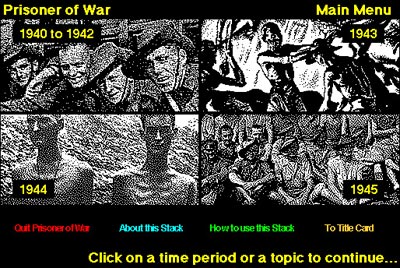
Main menu of the Prisoner of War HyperCard stack.
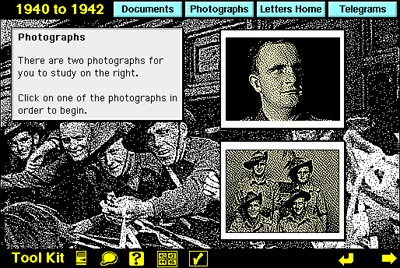
Entry point for Photographs 1940 to 1942.
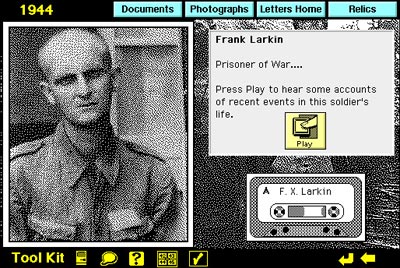
Photograph of my father taken in 1944 by the IJA. Clicking on the play button
allowed the listener to hear my father’s thoughts regarding the photograph.
HyperCard was an excellent tool. It introduced programming to the masses. Once I had figured out the navigation and the ‘stack map’ developing the stack, card by card, was straightforward. It was an enjoyable process and provided myself with a real sense of achievement.
When it was completed I placed it on a server at school with the help of two colleagues, Ken Orrock and David Emery. My Year Nine students could access it to complete a number of activities. They were amused by the fact that they were attending History lessons in the computer laboratory.
During subsequent years I wore a second hat at school and taught students how to create HyperCard stacks as part of their Design and Technology course. I made other stacks on Kite Flying, the Iceman and a simple game about the end of the world called Hunger City. That stack taught students about the importance of collecting appropriate evidence when creating a historical argument.
I actually racked my brain for a topic that I could use as the foundation for my first HyperCard stack. Various topics crossed my mind. One evening when I was going through my father’s relics it dawned on me. My father’s wartime experiences were the perfect topic. I had an interest in the topic and by scanning the letters, relics and photographs and by creating the stack I was able to share the relics with the students without fear that the original relics would be lost or damaged. The students could access the materials on the server via the stack. It was a great solution. I have since created a web site that feature my father’s relics.
A topic for which I had a passion, a piece of technology that clicked and a reasonably straightforward beginning. It was a good experience. I enjoyed it. The students enjoyed it. It reinvigorated my passion for education. I had reached a point in my career where I was basically teaching within a reasonably secure comfort zone. That HyperCard stack took me outside my comfort zone and set me on a journey that continues to this day.