Thoughts on teaching, technology, learning and life in an era of change.

Archive for the ‘ Teaching ’ Category

The Petrov Affair ~ Australia’s Cold War Flashpoint
January 2nd, 2008

Australia never experienced anything at all remotely resembling the Cuban Missile Crisis or McCarthyism but we did have the Petrov Affair.

Back in April 1954 Australia had its very own Cold War drama when Vladimir Petrov defected while employed as a third secretary at the Soviet Embassy in Canberra, Australia’s capital city.

The episode became known as the Petrov Affair and it dominated the Australian political landscape and newspaper headlines. Australians were caught up in “stories of espionage and political conspiracy”.

As the Old Parliament House web site states, “The defection of the Petrovs came to be regarded by Western intelligence services as one of the most important of the Cold War era and it had a profound and lasting impact on the Australian political landscape, with the Labor Party Split a direct consequence of the events of 1954-1955.”

The Old Parliament House (now known as the Museum of Australian Democracy) has an exhibit commemorating the event and in support they have created a web site rich with resources suitable for students of Cold War history near and far. There is also a web quest that students can explore. The resources are particularly useful for students of Australian history at Stage 5 of their schooling in NSW. There is a wealth of documents, photographs, media files and links to investigate. There is also a Wikipedia article regarding the event.

WebNode ~ build your own web site for free
January 2nd, 2008

A couple of days ago Paul Hamilton published a post concerning WebNode. I bookmarked the site and this morning I toyed around with some of its feature set. This tool is impressive and I will definitely share this site with the students when school goes back in a month.

WebNode allows you to build a web site. Not just any web site but a full featured web site plug and play construction, impressive widget embeds, RSS feeds, elegant templates, multiple file upload. You can even point your own domain name to the site. It is sensational. Signing up is straightforward.

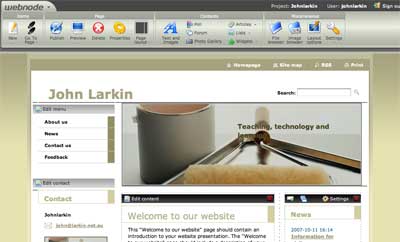
This morning I have simply created the initial template page and I have not made any changes other than deleting my email address from the contact module. I prefer to have my email address as an image so as to deter spambots.

If you look closely at the toolbars available in edit mode you will see that there is a rich set of options for you to explore.

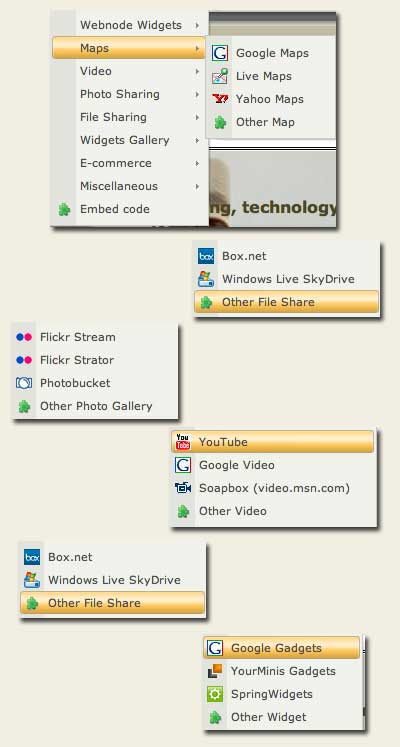
You can drag and drop text elements, image elements, forums, polls, lists, articles and a diverse range of widgets. The screen captures below will give you a guide to some of the widgets that you can embed.

This is truly a tool worth your exploring. I have really just scratched the surface. I wonder what will happen to the client based software tools such as Dreamweaver now that tools such as these are beginning to become mainstream?

The WebNode home page states there is no catch and I checked out their Media, About and the Terms and Conditions pages. There was one condition that I do consider a “catch” per se. Under the heading “Intellectual Property” they state:

“You acknowledge that by posting materials on the webnode site You grant to Us and Our licensors and assigns an irrevocable, perpetual, royalty free, worldwide licence to use the materials both within the webnode site and in any other manner. The licence extends to copying, distributing, broadcasting, and otherwise transmitting, and adapting and editing the materials.”

This will be a source of concern for some. I do wonder about allowing WebNode and their licensors to use your material as they wish. This is a good tool and has great potential. What are your thoughts?

Are you reading these blogs?
January 1st, 2008

During the break I have had the chance to catch up on my reading and research and as a result I have subscribed to some more blogs that I feel are interesting and contribute rich insights into the world of teaching, learning and technology. Let’s look at each in turn.

Langwitches. Silvia Tolisano’s blog is rich with excellent commentary, cross-cultural advice and practical technology insights. Her posts take you through the tools and technology in a manner not unlike that of Sue Water’s excellent blog, Mobile Technology In TAFE. One of the great aspects of Silvia’s blog is the regular post of her del.icio.us links. If you have not already done so then please add Langwitches to your blogroll.

Larry Ferlazzo’s Websites Of The Day For Teaching ELL, ESL, and EFL. Larry’s blog is simply brilliant. Many of you would have come to know of Larry’s blog via the nomination of an EduBlog award. Well deserved indeed. He has a wealth of information at his fingertips. His “Best of 2007“ reviews simply shone out from many of the other 2007 reviews that orbited the blogosphere of late. Larry not only blogs about teaching English as a second language Larry also covers relevant humanities, maths, science and current news sites and blogs for example. He has a great handle on tools that all teachers should find useful, web 2.0 and otherwise. His posts are objective, down to earth and simply informative. Subscribe to Larry’s blog now and be ahead of the pack.

Free Resources from the Net for (Special) Education. Paul Hamilton blogs about the tools and resources that are useful for educators of all persuasions. Just this week he enlightened me with a post about WebNode. [Web publishing software developers will need to look for a new job now]. That is a tool worthy of investigation. Check out Paul’s blog today.

Instructify. I shall allow Instructify to speak for itself. “Instructify is where teachers can stock their toolboxes with practical, time-saving classroom ideas and cutting edge methods of instruction. It is where to find useful, free technology to utilize in the classroom. And it is a fun place to spend your planning period. Instructify is not out to change the world or bemoan educational policy. Look, the Web is already full of education blogs ranting about how we need to remake the American school as a digital learning cooperative or something. Do you want to slog through a bunch of pie-in-the-sky pontificating about how Web 2.0 will magically change school from suck to success? Or would you rather find neat stuff you can use to improve things yourself?” How refreshing is that?

REMC Ramblings. REMC Ramblings is maintained by Kevin Clark, Instructional Technology Consultant for the Berrien County Intermediate School District. In this blog Kevin regularly posts his Weekly Web Wonders about useful tools, sites and news on the educational technology. His posts are straightforward, informative and point to a great deal of valuable resources.

Dan Cohen’s  Digital Humanities Blog. Dan Cohen is the the Director of the Center for History and New Media at George Mason University and a historian who explores and tries to influence through theory, software, websites, and this blog the impact of computing on the humanities. What more can I say other than that his blog is a great resource for teachers of history, just like myself.

Plethora of Technology. One might think that this blog is about technology. You will be wrong. Let Plethora speak for itself ~ “This blog is not really about technology. It is about teaching and learning. It is dedicated to giving educators a place to gain thought provoking ideas, web links, teaching suggestions, and a place for the author to vette out ideas. The author sees technology not as the goal, but as a tool to accomplish the real goal: greater learning towards understanding.”

A Teacher’s Life ~ Practicing Professional Generosity. This excellent blog is maintained by Lucy Gray, a lead technology coach and an Apple Distinguished Educator. Lucy regularly posts excellent links and slideshare presentations. Well worth worth a look.

Learning and Teaching in the 21st Century. As Jo points out on her blog she presents “a series of technology tips for educators. These tips provide ideas for learning, teaching, and using digital skills. The content varies so that the tips can be designed for you … new teacher or experienced, technophobe or cutting edge or somewhere in the middle. I hope you enjoy reading these tips and, especially, that you find some new, useful ideas. I would love to hear your ideas!”

Learning with Lucie. Lucie deLaBruere is an “educator exploring how to use emerging technology for teaching and learning. She is a regular contributor to the Infinite Thinking Machine and her blog is well worth investigating. Lucie provides links to wikis and other resources to support teachers and participants of her workshops.

The Bamboo Project Blog. Michelle Martin’s blog “is an ongoing experiment in life-long learning and exploring the opportunities of the Web”. Her posts are thoughtful, practical and constructive. Michelle has written some great posts on how to improve the readership of your blog, some nifty Web 2.0 links and the Building A Better Blog Ning. Add Michelle’s blog to your blogroll.

Learning with the Fang. Mike Seyfang’s blog tells it like it is. Informative and concise. Mike Seyfang has over 25 years ICT experience and as he poinst out on his mini bio he “has a flair and passion for harnessing creativity and innovation for tangible community outcomes.  His latest venture, LearnDog aims to help kids achieve positive life outcomes through recognition of their Vocational skills.

The curse of knowledge
January 1st, 2008

Just read an interesting article in the New York Times by Janet Rae-Dupree regarding innovative thinking and the curse of knowledge. The curse of knowledge “means that once you’ve become an expert in a particular subject, it is hard to imagine not knowing what you do. Your conversations with others in the field are peppered with catch phrases and jargon that are foreign to the uninitiated.” Perhaps it is the curse of knowledge that creates the barrier when education technologists are endeavouring to share their ideas with other educators not so well versed in the art of instructional technology.  We need to tap into the skills of “zero gravity thinkers” to tackle this issue so that the message can be adequately communicated and new ideas can be generated.

All in one page for workshop resources and presentations
December 29th, 2007

Spent some time rationalising all of the workshop documents and assorted presentations. I have a habit of modifying presentations and workshop guides each time they occur. Then I simply upload them up to the server with a different version number of name. It was time to clean out the directories and reduce some of the clutter.

I linked all of the resources to a single page for the sake of convenience as well. Feel free to download and  trawl through any of the resources. There are resources relating to blogging, wikis, photoshop, flickr, video processing, podcasting, vodcasting, web domains, the Blackboard LMS and lots more.