Thoughts on teaching, technology, learning and life in an era of change.

Archive for April, 2008

Historic Tale Construction Kit ~ The Bayeux Tapestry 1066
April 5th, 2008

This morning I read about the Historic Tale Construction Kit in the Instructify blog. This web based application allows you to create a sequence of mediaeval events using images drawn from the Bayeux Tapestry. I believe that teachers of history that cover the middle ages would find this application very useful on a number of different levels.
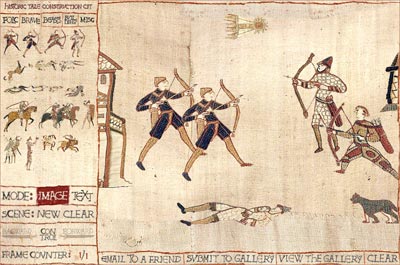
Teachers and students could recreate scenes from the tapestry and add additional text blocks that annotate the scene.

Scenes from the tapestry could be reworked thus generating arguments and controversies for debate. This could be considered a mediaeval form of “airbrushing” and “photo-retouching”. Discussion based upon “What if?” scenarios could be started.

The application allows the user to drag and drop a variety of characters, animals, beasts, plants, buildings and boats on to the canvas. These objects alone could be used as standalone focal points for analysis and discussion. You can also add authentic looking text to the canvas. They have even included Halley’s Comet which made an appearance in 1066 and was included on the original tapestry. You can create a sequence of scenes and advance from one to the next.

The user generated images can be emailed to a friend or sent to a gallery (although I could not get this to work). Savvy computer users could take a screen capture of the image, save it as a jpeg and then import it into a VoiceThread. Students could then add their own commentary to the image. They could also create an imaginative oral history based upon the characters in the mediaeval scene. The image in this post is a screen capture. Captured images could also be embedded in presentations, blogs and so on. There are opportunities for learning, debate, humour and fun. This is a captivating application.

It was a little buggy at times. I suspect that you can only drag a maximum of 9 or so objects onto the tapestry window. After that previously placed elements disappear. At times it appeared to freeze when you dragged an element on to the editing window from the palette at left. When embedding text you cannot place the cursor i-beam at the point you wish to re-edit. You have to use the delete or back-space key to return to the editing point. I was unable to publish to the gallery. My first attempt at using this online application can be found at this post.

I know that teachers of the Stage 4 History syllabus in NSW would find this a handy tool to use when teaching students about the society and people of the Middle Ages during Year 8 of their schooling. Students studying the Battle of Hastings will find it particularly useful.

As an aside I conducted a quick search for related sites and two of the more interesting were EuroDocs: Britain 1066-1485 which is a treasure trove of primary source material and The Bayeux Tapestry which provides a Quicktime VR panoramic view of the Bayeux Tapestry.

Links

Historic Tale Construction Kit
Medieval Sourcebook: William of Malmesbury, d. 1143?: The Battle of Hastings, 1066
Anglo-Saxon Sourcebook: The Battle of Hastings
The Battle of Hastings: A brief tour by Dr Deborah Vess
The Battle of Hastings according to Orderic Vitalis
J.P.Sommerville: The Battle of Hastings
EuroDocs: Britain 1066-1485
Britain’s Bayeux Tapestry at the University of Reading
Official site of the Bayeux Tapestry (French)
The Bayeux Tapestry
The Bayeux Tapestry ~ QuicktimeVR panorama
Wikipedia: Bayeux Tapestry and Battle of Hastings

—————-
Now playing: XTC – Senses Working Overtime
via FoxyTunes
Diigo at the Battle of Hastings ~ 1066AD
April 5th, 2008

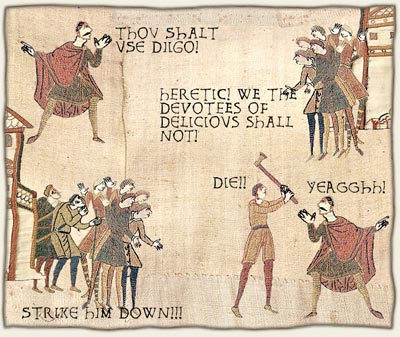
I was conducting a little research on the Battle of Hastings by closely examining the Bayeux Tapestry. It is 270 metres in length and 50 centimetres in height. It is an amazing document and truly one of the great primary sources of history.

Can you imagine my shock when I found a reference to the term diigo! I captured the scene and I reproduce it below for your enlightenment.

The image was created with Historical Tale Construction Kit. Via Instructify. Neat, eh? I shall blog a little more on this online app in the future.

—————-
Now playing: David Bowie – Kooks
via FoxyTunes

Sort Of ~ Dunno ~ Nothing
April 2nd, 2008

Well, what’s this video mean to you? I occasionally elicit replies like this at school. I definitely need to rethink my questioning techniques at times. A little more open ended.

Sort of ~ Dunno ~ Nothing by Peter Denahy

It is Sort Of Dunno Nothing by Peter Denahy. I want to make a joke about a popular online bookmarking slash social networking tool in relation to this song however I shall refrain.

Intute Subject Booklets ~ useful Internet skills for students
April 2nd, 2008

This post popped up in my reader just then. Its from Intute in the UK. They provide resources for students among other activities. Well worth a look-see. This is their blog. Have you subscribed to it?

There are guides/booklets that are designed to improve the Internet experience for students. Many students just Google a term and often choose a site without applying serious critical skills. This has come up in blogs before: Intute. EduBlog Insights. There must be many more.

http://www.intute.ac.uk/subjectbooklets.html

These booklets (html and pdf) are targeted at HigherEd but our seniors and brighter juniors could handle them. Topics include:

Science and Engineering:

Internet resources for environmental science [March 2008]
Internet resources for materials engineering [March 2008]
Internet resources for environmental engineering [March 2007]
Internet resources for physics [March 2007]
Internet resources for chemistry [July 2006]
Internet resources for computing [July 2006]

Arts and Humanities:

Internet resources for film and theatre [March 2008]
Internet resources for philosophy [March 2008]
Internet resources for fashion and beauty [March 2007]
Internet resources for religion and theology [March 2007]
Internet resources for archaeology [July 2006]
Internet resources for visual arts [July 2006]

Social Sciences:

Internet resources for education [March 2008]
Internet resources for Olympic studies [March 2008]
Internet resources for law [March 2007]
Internet resources for social research (2nd edition) [March 2007]
Internet resources for social welfare [March 2007]
Internet resources for business and tourism [July 2006]

Health and Life Sciences

Internet resources for biological sciences [March 2008]
Internet resources for pregnancy and childbirth [March 2008]
Internet resources for animal health [March 2007]
Internet resources for physiotherapy and orthopaedics [March 2007]
Internet resources for agriculture, food and forestry [July 2006]
Internet resources for healthcare and medicine [July 2006]

There are also interactive guides at the Intute Virtual Training Suite designed to teach students how to research more effectively when using the Internet. They cover a diverse range of topics. They are easy to follow. http://www.vts.intute.ac.uk/

[ Here I am cloning data. I shall try to blog something original or 'me' soon. I simply thought this would be useful news to share. ]

How do you lifestream fellow educators?
April 2nd, 2008

I use Jaiku. A while back I attended a gathering of like minded individuals in Singapore keen on using the net in positive and innovative ways. During the get-together Kevin Lim introduced Jaikus to the group. I thought it was a neat tool. Kevin Lim is an instructional technologist, studying for a doctoral degree at Buffalo University. His web site is well worth exploring.

The Jaiku takes in feeds from my blog, twitter, flickr, last.fm and other sources. It sits on my home page and acts like a What’s New? for my entire site. It is a miniature lifestream I guess.Last October, it was bought by Google. You now have to request an invite to get a Jaiku. It has been like that ever since. What is happening there?

The embed code does not work in a post strangely enough. WordPress strips out some of the code.

Addendum in the afternoon, after school. I added it to the sidebar instead. Looks pretty, eh?  That sidebar is chock-a-block full or crap. Need to clean it up a bit. What should go?